Best Practices for Setting Up Categories and Assigning Pages
Practices that might streamline the posting of positions and reduce issues with assigning pages to positions include the following:
1) Consider reducing the number of categories being used by the district.
Categories are used to group similar position types within the position list. Typically, districts use about a dozen categories. There are pros and cons of creating more than a dozen categories. Having a lot of categories does allow more specific places to put your vacancies. But the cons seem to outnumber that benefit. The negatives for so many categories include the following:
More overhead is required since each new category requires that pages must be assigned.
Empty categories clutter and confuse applicants on the Position Desired (pools) page.
Searches for applicants "by category" become nearly impossible
Administrators need to know where the vacancy was posted. For example, if a district does not consistently use Middle School and sometimes posts positions using Junior High, then the administrator may need to look in both categories to find their vacancy.
The HR office needs to remember and consistently post vacancies in one category or another (Middle School/Junior High)
Applications in blank categories are totally impossible to share.
2) Edit categories with no positions to be “off the application”.
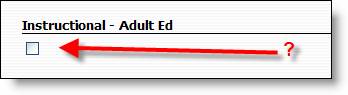
Another issue that has been noticed was that some of the categories for districts, such as Instructional-Adult Ed, had no position types listed in them. If a category does not have a position type for it, it should be removed from the application so as not to cause confusion on the Position Desired page for applicants. Notice the image below that shows the category with missing type that the applicant sees when on the Position Desired page.
This can be done from the Edit Position link by clicking the Edit button next to the blank position and setting On Application to No and Save.
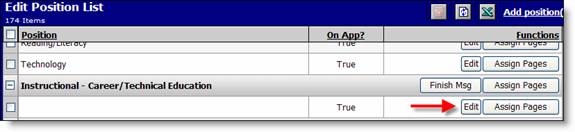
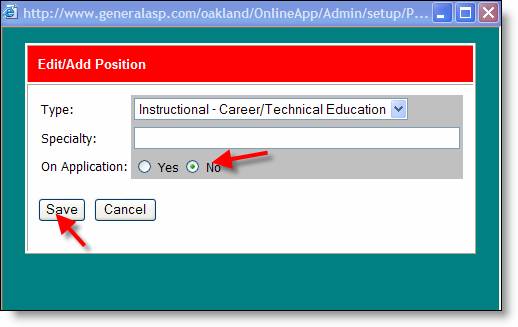
Changing this does not affect the vacancies for the position/category type and new vacancies can continue to be posted against the position/category. If this is used, it could be called a “vacancy only category.” In other words, no associated pool exists.
3) Assign pages to categories.
It is good practice to assign as many of the pages by category as possible to avoid the overhead time of assigning pages for each position and to avoid situations with no pages being assigned.